



I find Zocdoc - Find and book doctors most useful when the difficult part of getting care is not deciding that I need help, but finding a suitable appointment without calling several offices. It is a free medical app from Zocdoc, Inc. that brings doctor search, insurance filtering, appointment availability, and patient reviews into one place. In my experience, its main appeal is practical rather than flashy: it can turn a vague search such as “I need a dermatologist who accepts my plan” into a more manageable booking task.
The app is aimed at ordinary healthcare appointments rather than emergency treatment. That distinction matters. I would use it to look for a primary care visit, a specialist, or another routine consultation, but I would never treat it as a replacement for urgent services or professional medical advice. Its value depends heavily on whether the doctors and appointment slots I need are represented in my area, so the experience can feel excellent in one search and much less useful in another.
How the app works when I need an appointment
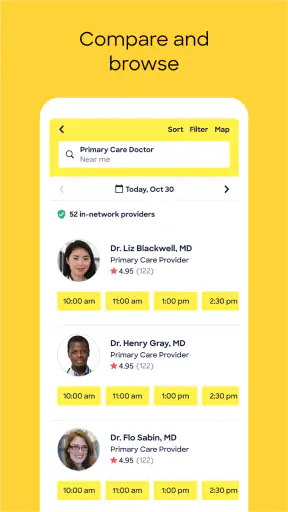
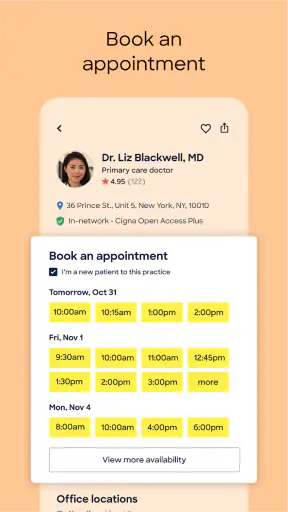
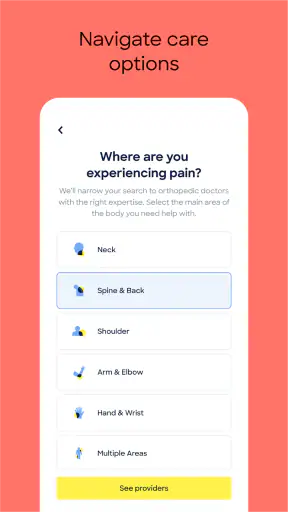
The basic workflow is straightforward. I start by choosing the type of doctor or care I am looking for, then narrow the results using practical details such as insurance and availability. Seeing open appointment times early in the search is more helpful than browsing office profiles and discovering later that the next appointment is weeks away. That real-time focus is the part that separates this app from a simple directory.
I also pay attention to the difference between finding a provider and actually choosing one. A search result may look suitable because the specialty and location match, but the insurance details, appointment format, office distance, and patient feedback still need a careful look. I would not book solely because a profile appears near the top. The app makes comparison easier, but it does not remove the need for my own judgment.
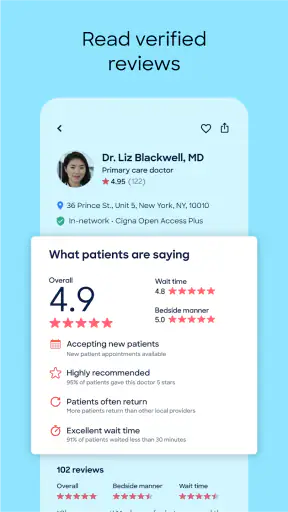
The verified-review element is particularly useful when I am unfamiliar with a practice. Reviews cannot tell me whether a doctor is personally right for me, and they should not be treated like a clinical recommendation. They can, however, reveal patterns that are relevant to a first visit, such as recurring comments about scheduling or the general office experience. I use them as one signal among several instead of letting a single enthusiastic or negative comment decide everything.
One practical habit is to search with a little flexibility. If I insist on one exact neighborhood, one exact day, and one narrow appointment type, the results may be limited even when nearby options exist. Expanding the location slightly or checking another day can make the app much more useful. This is not a hidden button or a special trick; it is simply the best way to work with an appointment marketplace where availability changes.
What the free price means in practice
The app itself is free, so I can install it and use its search and booking purpose without paying an app purchase price. That makes it easy to try before deciding whether it fits my healthcare routine. Free access is important here because the benefit is situational: if I can already reach my preferred office easily, I may not use the app often, while someone struggling to compare providers may find it immediately worthwhile.
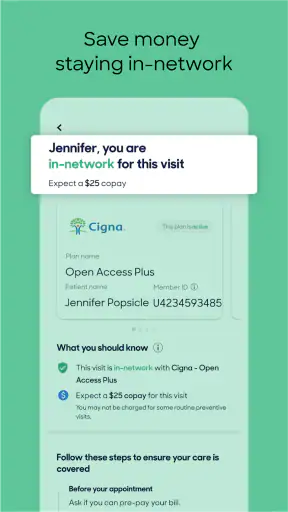
Free access should not be confused with free medical care. The cost of an appointment, consultation, copayment, deductible, or other healthcare charge is separate from the app’s price and depends on the provider and insurance arrangement. I would verify those details with the office and my insurer rather than assuming that booking through a free app makes the visit free. This is the most important cost distinction for a new user.
I also would not judge the app by the absence of a subscription-style benefit. Its value is the time and effort it may save while arranging care, not a promise that every medical expense disappears. For a person who needs one appointment quickly, that convenience can be meaningful. For someone comparing providers who are not listed or whose insurance information is difficult to match, the free download may still require additional calls and checking.
Where it delivers more value than a normal search
A general web search can find clinic websites, phone numbers, and map results, but it often leaves me to repeat the same questions: Do you accept my insurance? Are you taking new patients? What is the earliest opening? Zocdoc brings those questions closer together. I can begin with the care I need and evaluate available options instead of opening many separate websites and calling them one by one.
That advantage is strongest for people who are new to an area, changing insurance, or looking for a specialist outside their usual network. It is also useful when a routine need has become time-sensitive but is not an emergency. For example, if I move and need a new primary care doctor, I can search by plan and location, examine the available profiles, and look for an appointment that works with my schedule. The app gives me a starting point that a blank search engine page does not.
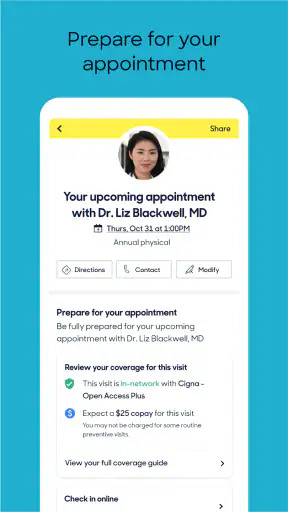
Another worthwhile use is preparing before I book. I can compare several providers rather than accepting the first office that appears. I would check the specialty wording, location, insurance selection, reviews, and appointment timing together. A nearby doctor with an opening tomorrow may be more practical than a highly appealing profile that cannot see me for a long time, while a more distant office may be worth considering for a specialist I expect to visit repeatedly.
The app can also reduce the friction of arranging care outside normal office hours, at least when suitable openings are displayed. I like the idea of checking availability on my own schedule instead of waiting until a clinic phone line opens. Still, I treat the displayed appointment as an opportunity to investigate, not as proof that every administrative detail is settled. Healthcare scheduling can involve forms, referrals, insurance rules, and office-specific requirements.
The tradeoffs I would consider before relying on it
The biggest limitation is coverage. A provider who is highly recommended by a friend may not appear in the search I am using, or may not show the kind of appointment I need. In that situation, the app cannot replace a direct call or the provider’s own website. I would use it as an additional route to care, not as a complete directory of every medical professional.
Insurance filtering is helpful, but I would still confirm the result before attending. Insurance networks can be complicated, and the exact service, location, or clinician can affect what is covered. A profile that seems to match my plan is a good reason to investigate further, not a guarantee of the final bill. This extra verification step slightly reduces the convenience, but it is far better than treating an app search as a billing promise.
Real-time openings are another strength with an important caveat. An available slot is valuable only if the appointment type is appropriate and I can complete any required preparation. I would read the profile carefully before selecting the earliest time. Booking speed is not the same as receiving the right care, and choosing a convenient slot with the wrong specialist can create more delay later.
Reviews also need restraint. They are useful for spotting recurring practical themes, but they are subjective and cannot measure the quality of a diagnosis or determine whether a treatment plan is medically appropriate. I would avoid making a sensitive healthcare decision from star averages alone. The best use of reviews is to add context to information such as specialty, insurance, location, and availability.
There is also a personal-data consideration whenever I use a healthcare service. I would review the app’s current privacy and account information before entering anything I am uncomfortable sharing, especially if I am only browsing. I would keep sensitive medical details for the appropriate clinical conversation and avoid assuming that a booking tool is the same thing as a secure patient portal for every kind of record or communication.
A realistic appointment-search scenario
Imagine that I have recently changed insurance and need a routine appointment with a new doctor. I would begin by selecting the relevant type of care, entering my insurance choice, and setting a location that is realistic for regular visits. Instead of booking the first result, I would compare several profiles, check whether the available time actually suits my schedule, and read reviews for recurring administrative issues.
Before confirming, I would make a short checklist: Is this the correct specialty? Is the office location convenient? Does the appointment appear to match the type of visit I need? Do I need a referral or additional confirmation from the insurer? If any answer is unclear, I would contact the office. This workflow uses the app for what it does best—shortlisting and finding openings—while keeping the final responsibility with me and the healthcare providers.
If the first search produces no good choices, I would adjust one factor at a time. I might widen the distance, check another day, or reconsider whether I need a particular subspecialty. Changing everything at once makes it harder to understand why the results changed. This small method is one of the more useful ways to avoid concluding too quickly that the app has no options.
Who is likely to get the most value
I think the app is a strong fit for people who dislike phone-based scheduling, have recently moved, need to compare doctors, or want to see appointment possibilities before committing to a provider. It is especially practical for a person who knows the kind of care needed but does not yet have a trusted local office. The combination of insurance search, openings, and reviews gives that user several decision tools in one workflow.
It can also help busy people who need to coordinate a visit around work, school, or family responsibilities. Choosing from visible openings is often easier than exchanging several calls with a receptionist. Parents or caregivers may appreciate the ability to organize the search around location and timing, although I would still check the provider’s suitability for the specific patient before booking.
The app is less compelling for someone who already has a preferred doctor and an established patient portal. In that case, the clinic’s own system may offer more direct access to records, messages, referrals, and follow-up care. I would also look elsewhere first if I need emergency attention, highly specialized care that is difficult to describe in a search field, or a provider known to be outside the app’s listings.
People who expect the app to answer medical questions should skip it for that purpose. It is a discovery and scheduling tool, not a diagnostic service. If I am unsure whether symptoms require immediate attention, I would seek appropriate medical guidance rather than spending time comparing appointment slots. The convenience is valuable only when the situation is suitable for routine booking.
My verdict on using it
After looking at the whole experience, I see Zocdoc as a useful free layer between “I need a doctor” and “I have a confirmed plan.” It does not eliminate every healthcare complication, but it can make the first search much less scattered. The combination of provider discovery, insurance-oriented filtering, visible openings, and verified reviews gives me more context than a phone number or a map listing alone.
The app has a strong reputation, with a 4.8 average from around 52 thousand ratings and about 7.3 thousand written reviews. It has passed one million installs, which suggests that this booking approach is familiar to a substantial audience. It is rated for Everyone, and the current release is version 3.253.0, with support beginning at OS 8.0. Those details make it broadly approachable for people using compatible Android devices, while the same practical considerations about coverage and insurance still apply.
I would recommend trying it when I need to compare local providers or find a routine opening quickly, particularly after a move or insurance change. I would not make it my only healthcare resource, and I would confirm coverage and appointment details before assuming everything is settled. My buy-or-skip decision is simple: use it if appointment discovery is your problem; skip relying on it if you already have a trusted clinic or need urgent, highly specialized, or directly managed care.
For me, that is a fair value proposition for a free medical app. It earns a place in the toolkit because it can save searching time and make provider comparisons more concrete. Its limits are not deal-breakers, provided I remember what it is: a convenient way to look for and arrange care, not a substitute for the clinical relationship, insurance confirmation, or judgment that comes afterward.


